Check Broken Links WordPress: Find & Fix Broken Links
Your site breaks quietly while you’re busy. Check for Broken Links scans every corner of your WordPress site and alerts you the moment something goes wrong — before Google finds it first.
Tested up to WordPress 7.0 · Lightweight & Fast · 4,350+ Downloads
” Simple but effective and works as it should, thank you “
” In 10 minutes did my first check and found and fixed my broken links.”
” No membership, no cloud, no muss, no fuss. Just works. Thank you “
Everything you need to keep your site healthy
Free
- Scan posts and pages to find broken links on a WordPress website
- Detect 404 errors, dead links, and faulty links
- Scan custom post types
- Scan slider content
- Scan comments and embedded internal and external links to catch problematic URLs before they can harm site reputation
- Detect broken images on your site
- Filter results with filtering options by file type, link type, and status
- Export results to CSV
- Check all the links on your site to help keep them working properly
- See exactly where each broken link appears
- Full control, no automatic changes to your content
- Free forever, no credit card required
PRO
- Everything in Free, plus:
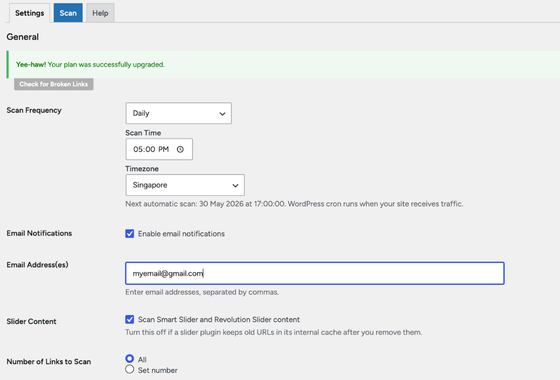
- Automatic scheduled scans (daily, weekly or monthly) to complement the manual scanning options in Free
- Choose your scan time and timezone
- Email reports delivered to your inbox with email notifications the moment broken links are found
- Set your notification email address for alerts
- Set it once, forget it, we alert you when something breaks to help keep your website in top shape and error free
- Priority support
- 1 site license
Simple. Automatic. Reliable
Step 1 – Install
Install the plugin and run your first manual scan in seconds. See every broken link across your entire site instantly.
Step 2 – Set Your Schedule
Choose daily, weekly or monthly. Pick your scan time and timezone. These scheduled scans are one of the key tools for keeping your WordPress site healthy with fewer errors over time. They also help prevent search engines from repeatedly hitting broken URLs during search crawling.
Step 3 – Get Alerted
The moment a broken link is detected you get an email report with comprehensive reports details, a useful feature that includes the link text, its status, exactly where the issue appears, and filtering by error type such as 404, 403, or 500 when reviewing issues. This helps you remove broken links before they negatively affect users and search engine optimization. Some SEO suites also include advanced site auditing features to find broken links, but this plugin keeps reporting focused and straightforward inside WordPress.
Simple. Honest. Pricing
Free
$0
PRO
$39.99/year
Broken link checker: Broken links hurt your SEO. You just don’t know yet.
Every time Google crawls your site and hits a 404, it can negatively impact visibility in search results and weaken how a search engine views your content. The problem is internal links and external links can break silently across a website — a page gets deleted, a plugin gets abandoned, an external site goes offline. Broken links on your site can also negatively affect users and the signals sent to a search engine. Regular scans help keep the website maintained for search without constant manual checks. If a URL changes or a page is removed, redirects help maintain SEO rankings, whether you’re making simple link tweaks or managing fixes inside one seo. Using redirection also preserves link equity when fixing broken links. With Pro, you find out first.
FAQ
What is Check for Broken Links?
Check for Broken Links is a WordPress plugin that scans your entire site for broken links, dead URLs, and 404 errors. It checks posts, pages, custom post types, comments, and slider content and shows you exactly where each broken link was found.
Do I need the Pro version to use the plugin?
No. The free version gives you full manual scanning with no limits. Pro adds automatic scheduled scans and email alerts so you never have to remember to check manually.
How is this different from other broken link checkers?
Most external tools scan your site from the outside and miss private content, drafts, and pages behind login. Because this plugin lives inside WordPress it scans everything, including content no external tool can reach.
Will it slow down my site?
No. Scans only run when you trigger them manually or on your set schedule, typically at night when traffic is low. There is no continuous background process affecting your site speed.
What happens when a broken link is found?
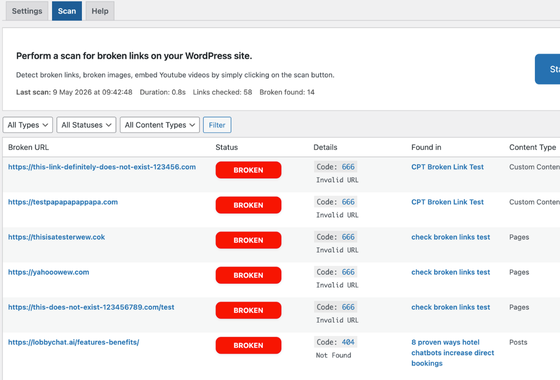
You get a results table showing the broken URL, the page it was found on, the error code, and the content type. Pro users also receive an email report automatically.
Can I cancel my subscription?
Yes, you can cancel anytime from your account dashboard. You keep access until the end of your billing period. No questions asked.